Using pireppirep 사용법
One folder, read properly, with every outside change kept. This document is what the app does and where it puts things.폴더 하나를 제대로 읽고, 밖에서 생긴 변경을 전부 보관해요. 이 문서는 앱이 하는 일과 그것들이 어디에 놓이는지를 적은 거예요.
What pirep ispirep이 무엇인가
You keep your notes as Markdown files in a folder. Lately you are not the only one writing to them: an agent rewrites a section, a script appends a log, a sync folder pulls in someone else's edit. Open a file a week later and you cannot tell what is new.노트를 폴더 안 마크다운으로 두고 쓰는데, 요즘은 거기 쓰는 게 나만이 아니에요. 에이전트가 한 절을 고쳐 쓰고, 스크립트가 로그를 붙이고, 동기화 폴더가 남의 수정을 끌어와요. 일주일 뒤에 열면 뭐가 새로 생긴 건지 알 수가 없어요.
pirep watches one folder and answers that question. It renders the documents properly, keeps a version every time something outside the app changes a file, and shows you a word-level diff between the version you last read and the file as it is now.pirep은 폴더 하나를 지켜보면서 그 질문에 답해요. 문서를 제대로 그려 주고, 앱 밖에서 파일이 바뀔 때마다 그 판을 보관하고, 마지막으로 읽은 판과 지금 파일을 단어 단위로 비교해서 보여줘요.
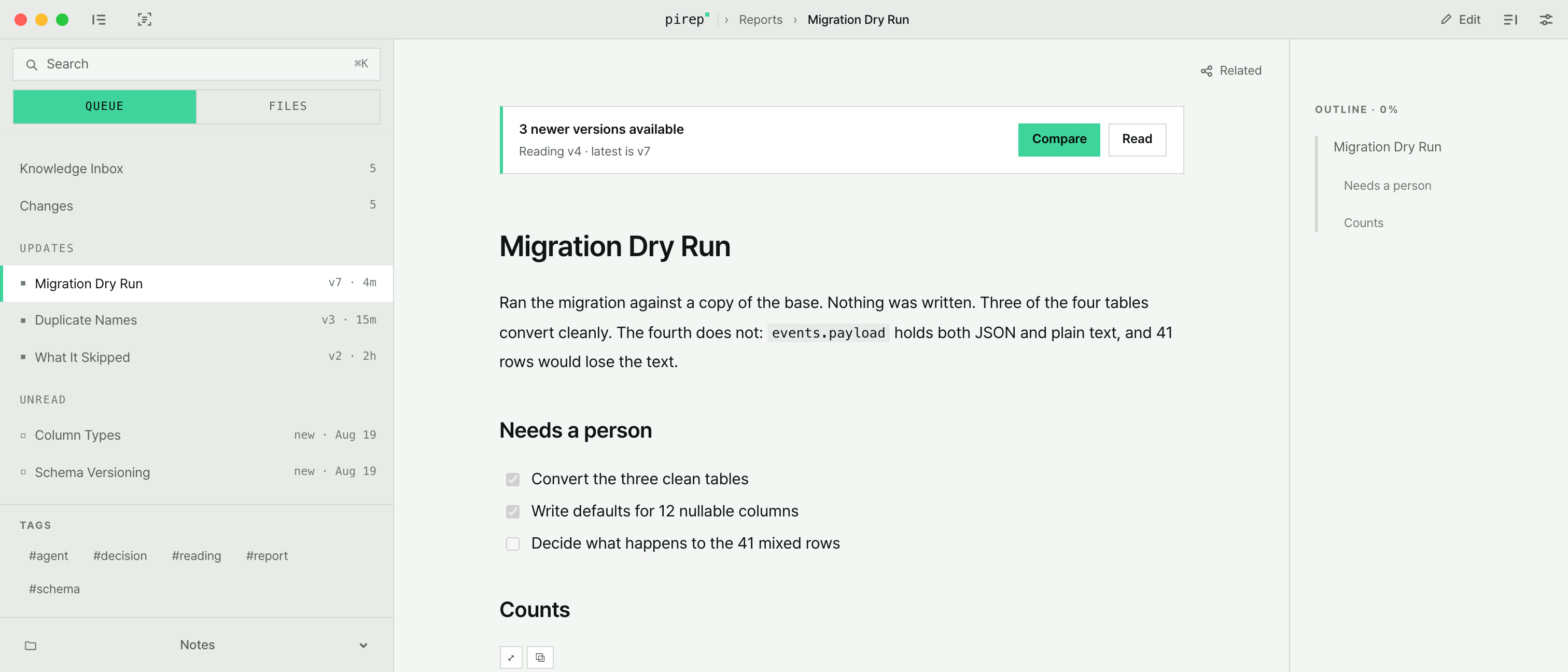
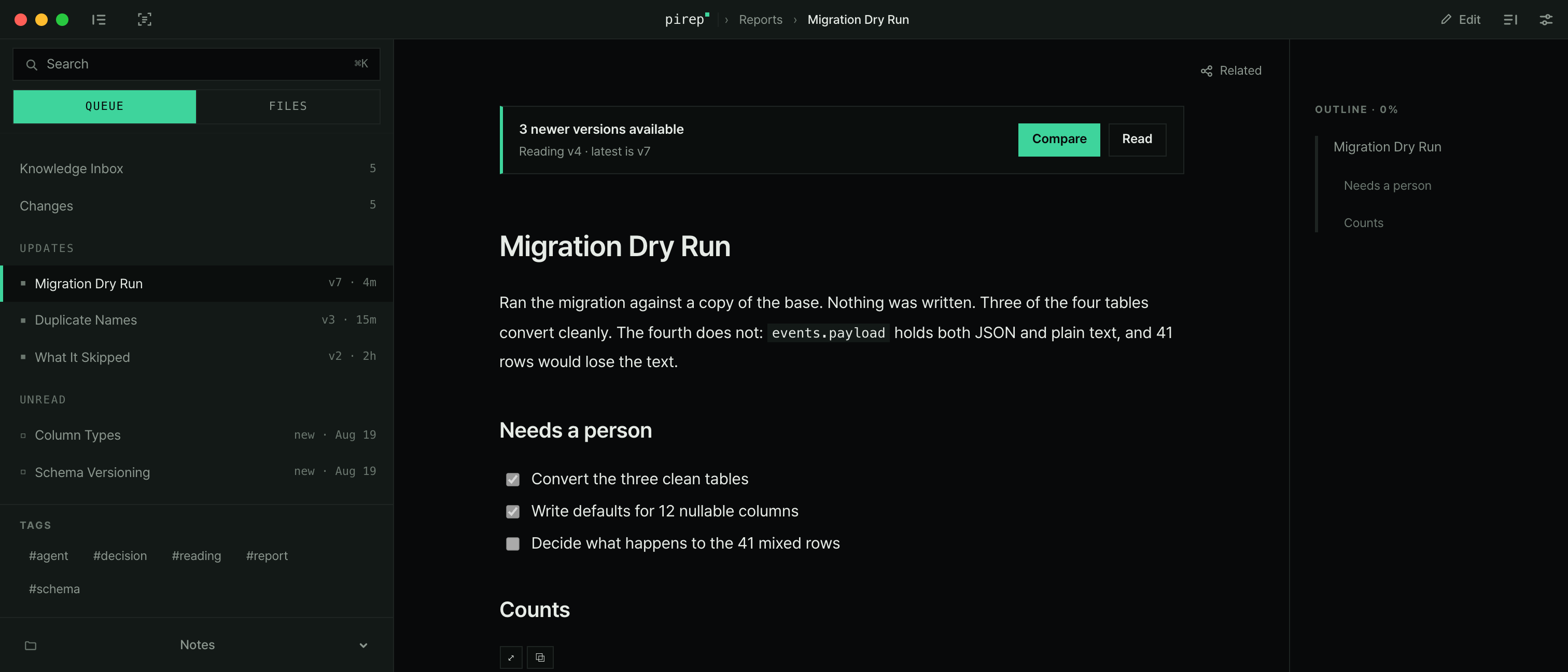
No server, no account, no cloud. The files stay in your folder; pirep only reads them.서버도 계정도 클라우드도 없어요. 파일은 폴더에 그대로 있고, pirep은 읽기만 해요.
Install설치
One line, or the dmg. The installer puts the latest release in /Applications and does not use sudo.한 줄이면 되고, dmg로도 받을 수 있어요. 설치 스크립트는 최신 릴리스를 /Applications 에 넣고 sudo를 쓰지 않아요.
For the dmg: download it from the latest release, open it, and drag pirep onto the Applications folder next to it.dmg로 받으려면 최신 릴리스에서 내려받아 열고, 옆에 있는 Applications 폴더로 pirep을 끌어다 놓으면 돼요.
Building it yourself: Node.js, pnpm, Rust and the Xcode Command Line Tools, then pnpm install && pnpm tauri build.직접 빌드하려면 Node.js·pnpm·Rust·Xcode Command Line Tools 를 갖추고 pnpm install && pnpm tauri build 하면 돼요.
First launch — macOS blocks it once첫 실행 — 한 번 막혀요
The app is not signed with a paid Apple certificate, so macOS blocks it the first time. Nothing is wrong with the app, and it is a one-time step.유료 애플 인증서로 서명하지 않아서 macOS가 처음 한 번 막아요. 앱에 문제가 있는 게 아니고, 한 번만 하면 되는 절차예요.
If macOS says the app is damaged, remove only its quarantine flag and open it again.'손상되었다'고 나오면 격리 플래그만 지우고 다시 열면 돼요.
One folder — your Base폴더 하나 — Base
pirep watches one folder and calls it your Base. The first screen offers two ways in: New Base creates an empty folder and sets it as a Base, Open existing folder opens one that already contains markdown. Both open the native folder picker.pirep은 폴더 하나만 지켜보고, 그 폴더를 Base라고 불러요. 첫 화면에 들어가는 길이 둘 있어요. New Base는 빈 폴더를 만들어 Base로 삼고, Open existing folder는 이미 마크다운이 있는 폴더를 열어요. 둘 다 맥 기본 폴더 선택창을 띄워요.
Once a folder is picked, pirep walks the tree — skipping .pirep, node_modules, target and dot-directories — and starts watching it for changes. Your documents never move.폴더를 고르면 pirep이 그 안을 훑어요. .pirep·node_modules·target·점으로 시작하는 폴더는 건너뛰고요. 그다음부터 변화를 지켜봐요. 문서는 자리에서 움직이지 않아요.
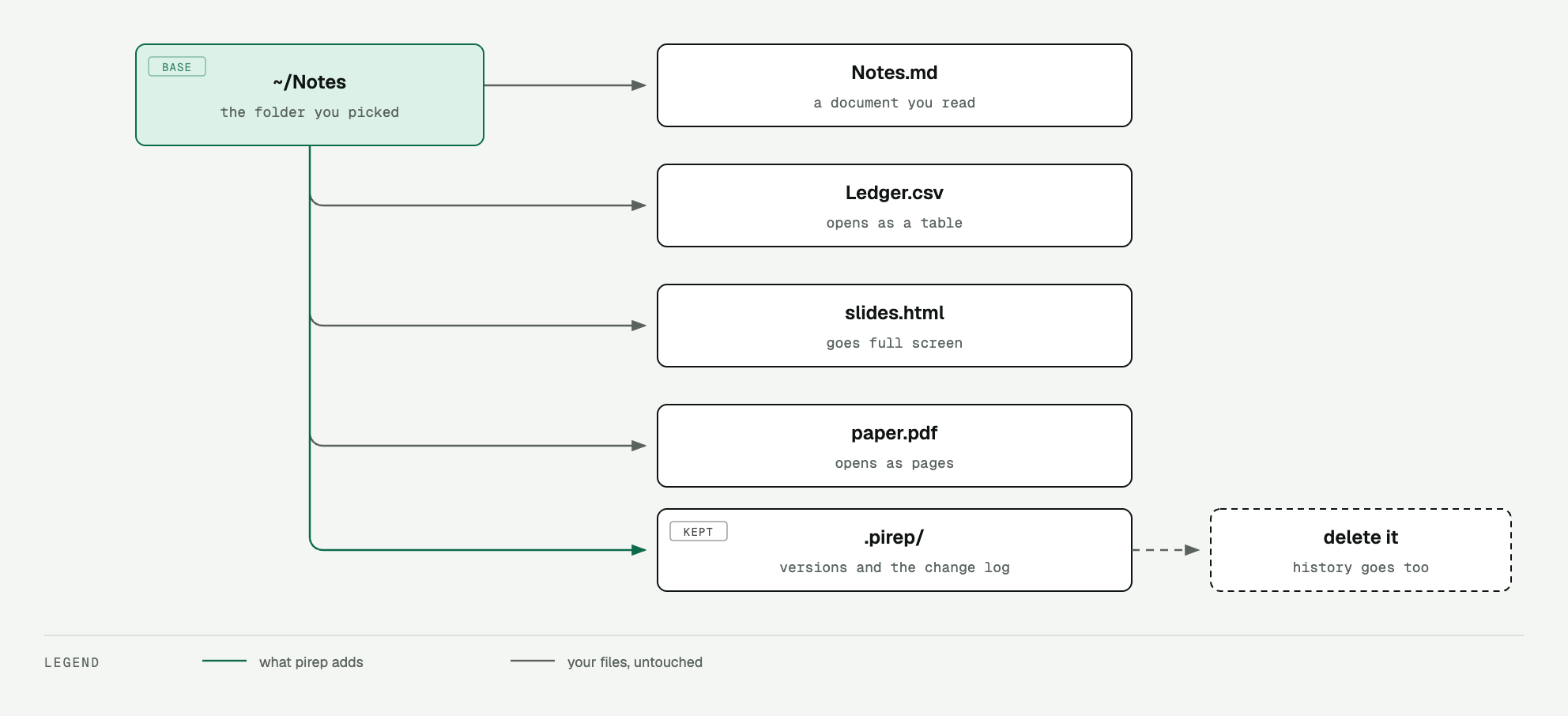
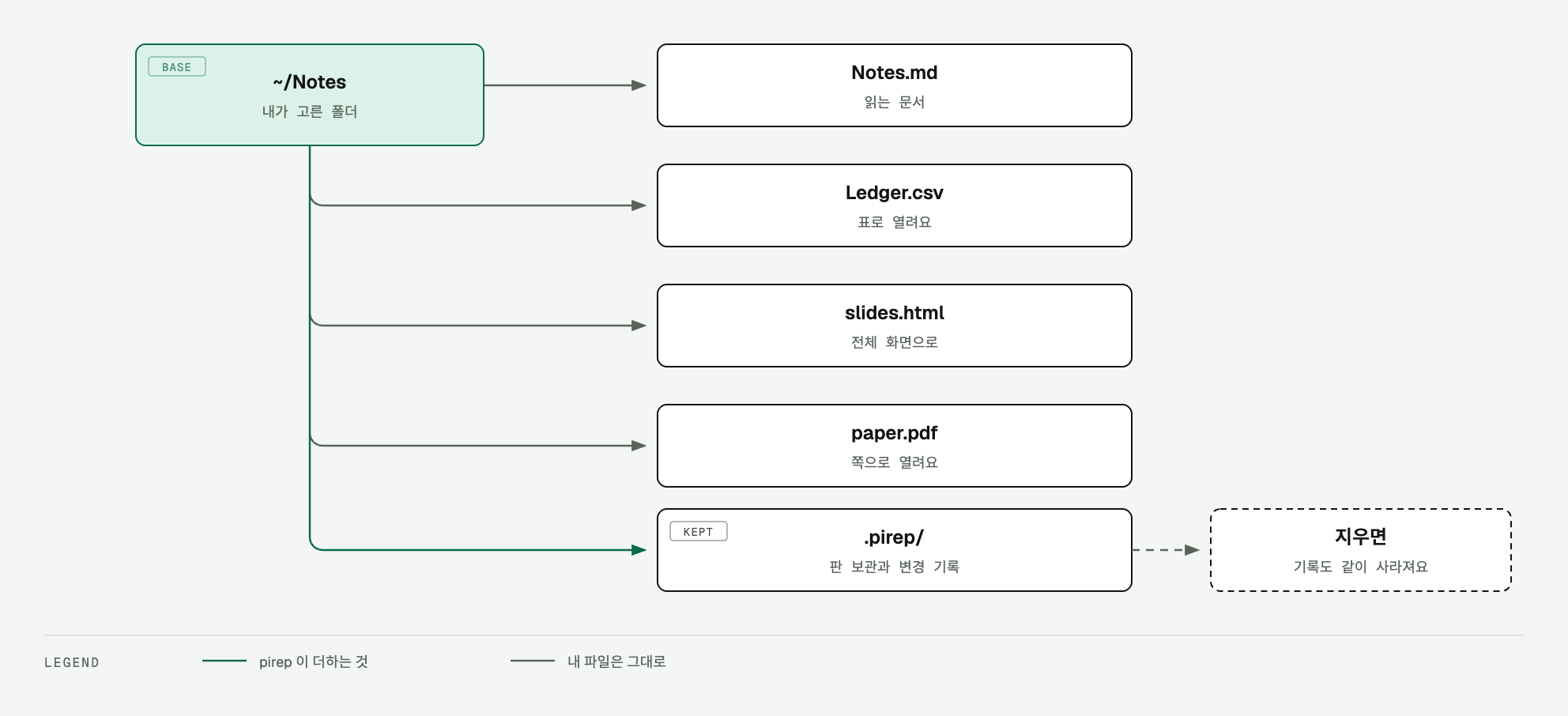
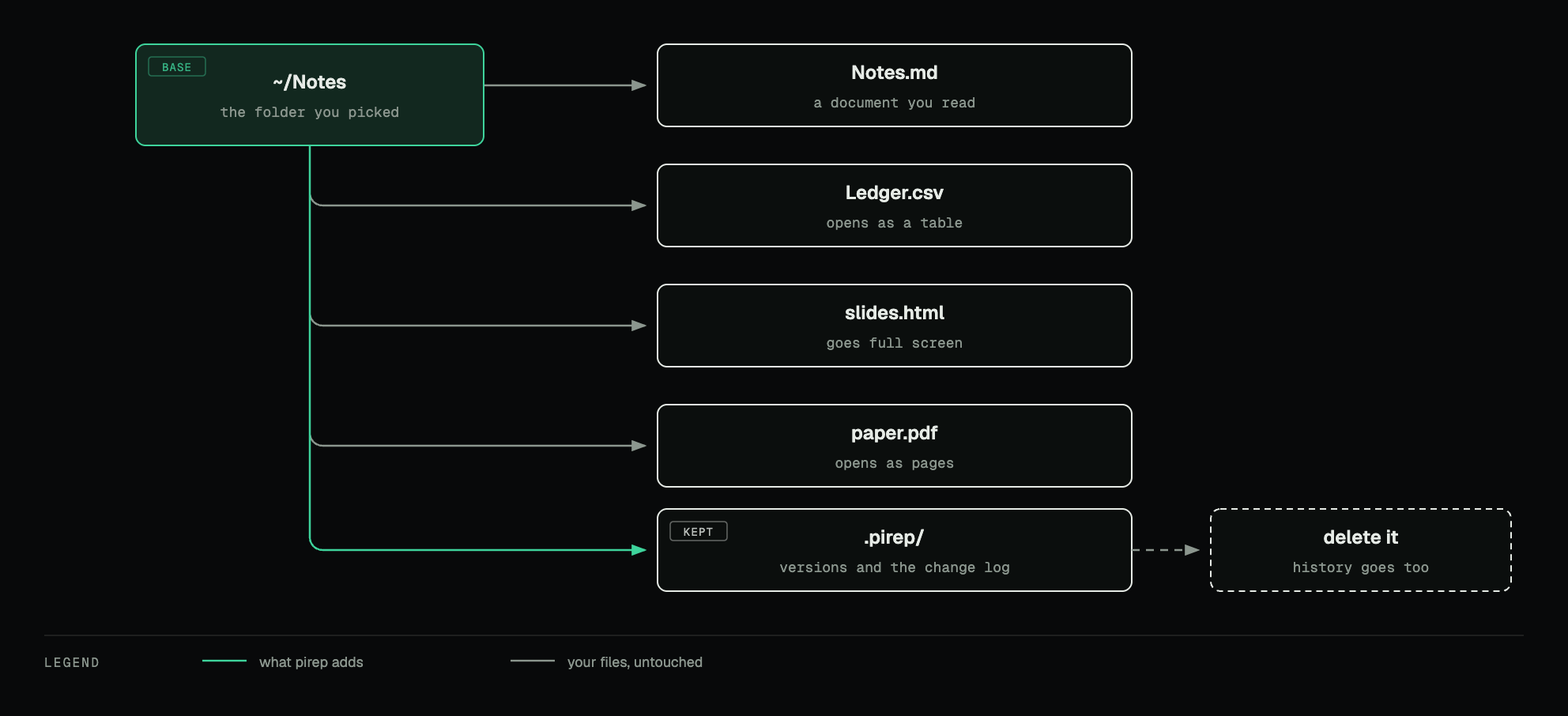
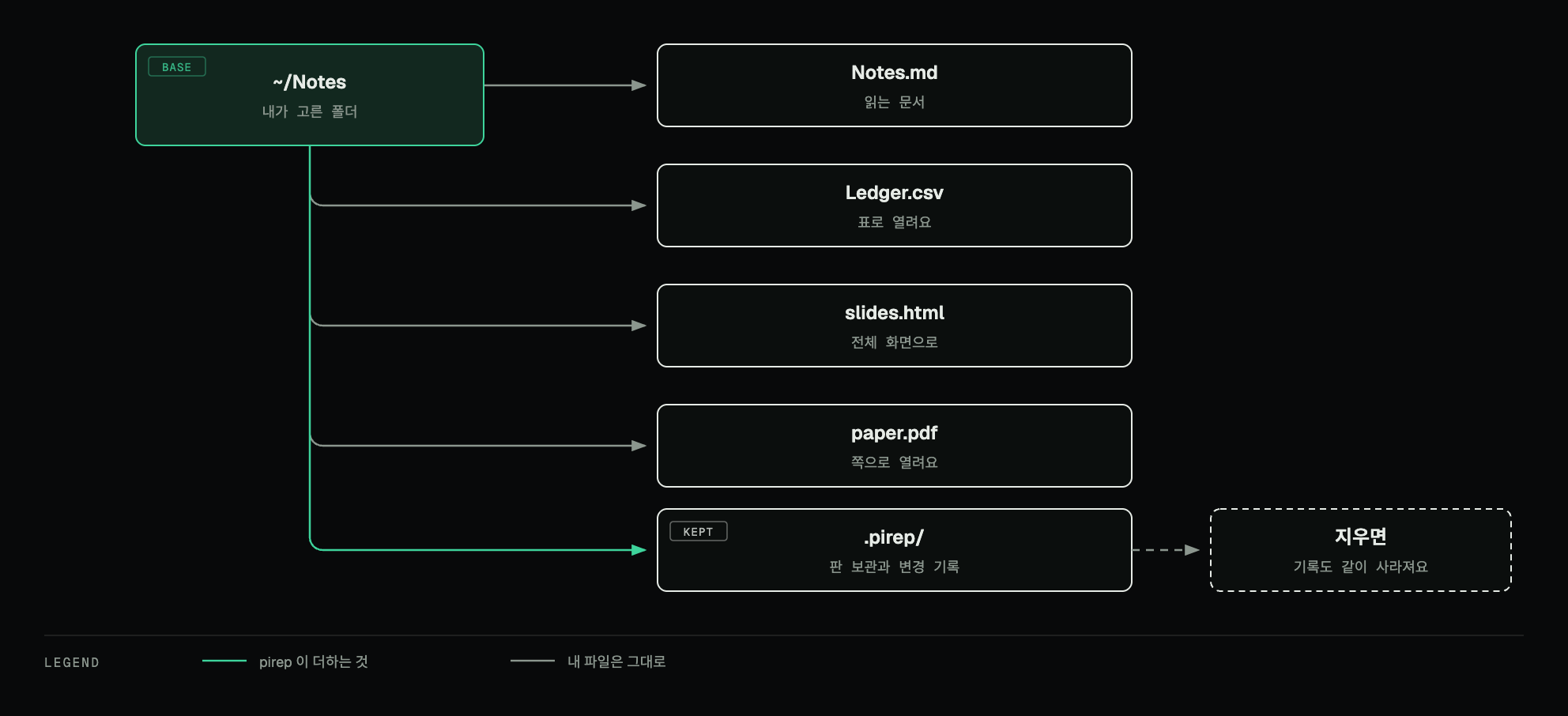
the Base is your folder; only .pirep is pirep'sBase 는 내 폴더고, pirep 의 것은 .pirep 하나뿐이에요
You can change your Base anytime in Settings → Base → Change. The Base screen also shows whether the folder already sits in a synced location.Base는 언제든 설정 → Base → Change 에서 바꿀 수 있어요. 그 화면에서 이 폴더가 이미 동기화되는 위치인지도 알려줘요.
Reading a document문서 읽기
The reader is the point of the app, so markdown is rendered rather than approximated.읽는 화면이 이 앱의 본체예요. 그래서 마크다운을 대충 흉내 내지 않고 제대로 그려요.
Alongside the document there is an outline of its headings, a properties panel for its frontmatter, and Related Topics. Focus mode clears everything else away.문서 옆에는 제목 목차, frontmatter 를 보여주는 속성 칸, 그리고 관련 주제(Related Topics)가 있어요. 집중 모드를 켜면 나머지가 다 사라져요.
The sidebar — what is waiting사이드바 — 무엇이 기다리고 있나
The sidebar has two tabs: QUEUE, what is waiting to be read, and FILES, the folder as it is on disk.사이드바에는 탭이 둘 있어요. QUEUE는 읽을 것이고, FILES는 디스크에 있는 그대로의 폴더예요.
The Knowledge Inbox itself opens with a greeting, an Updated since your last visit card, quick actions for a daily note or a note from a template, and four counts — Notes, Tags, Unread updates, Pinned.Knowledge Inbox 화면에는 인사말과 Updated since your last visit 칸, 오늘 날짜 노트나 템플릿에서 새 노트를 만드는 빠른 버튼, 그리고 숫자 넷이 있어요 — Notes · Tags · Unread updates · Pinned.
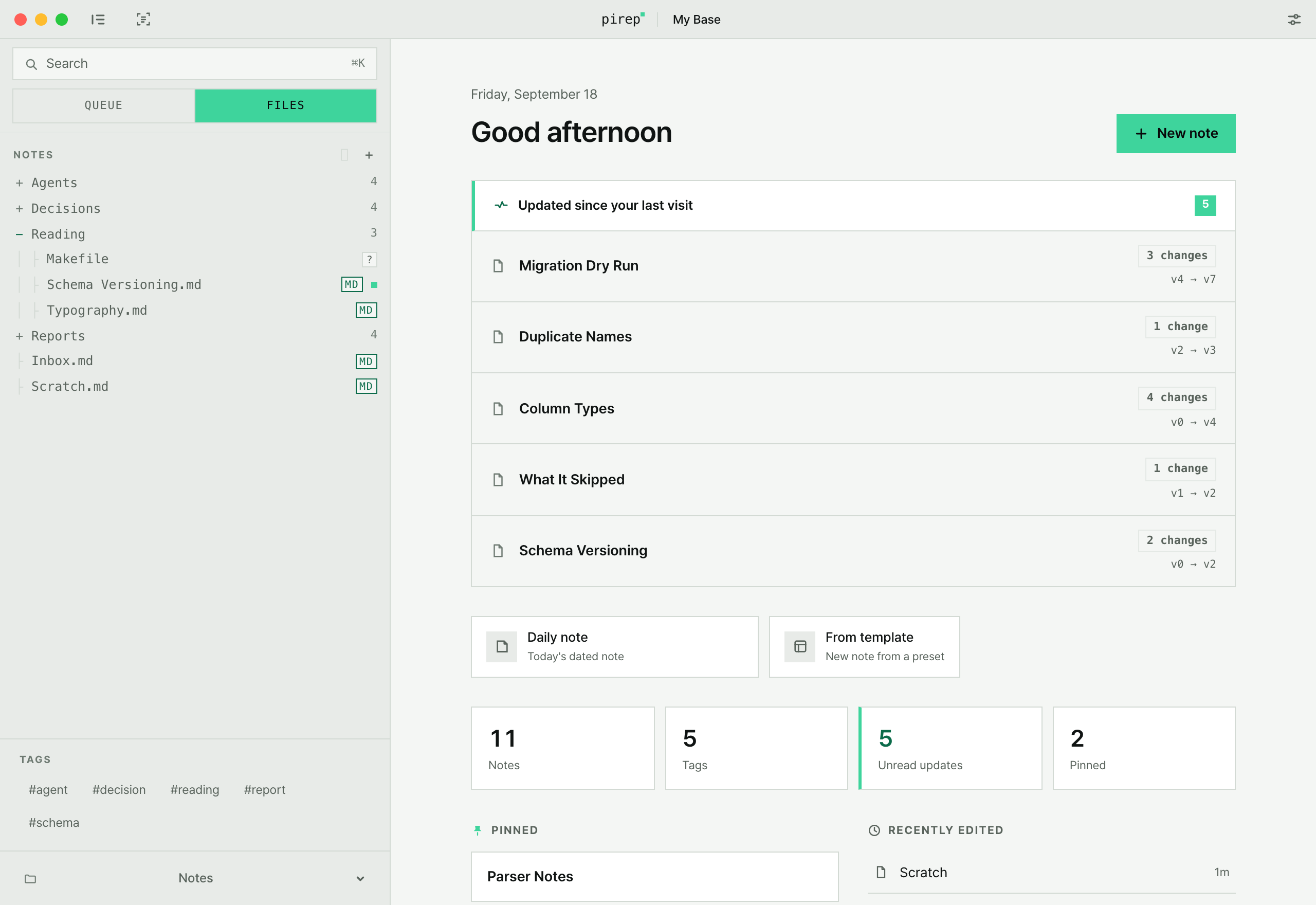
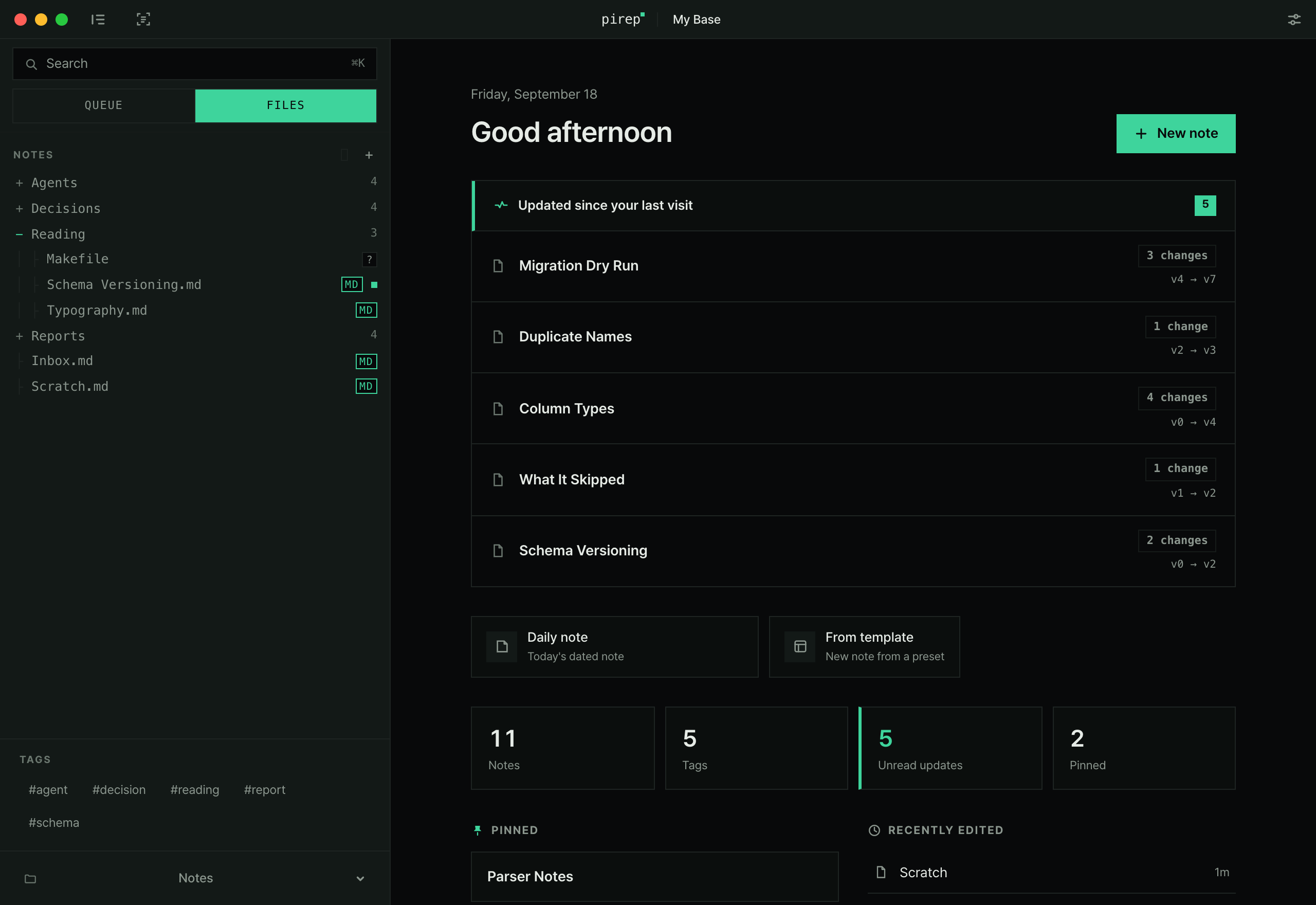
Changes — what moved while you were away바뀐 내용 — 자리를 비운 사이에 뭐가 움직였나
Every time something outside the app writes to a file in your Base, pirep keeps that version. The document then appears under Changes, and opening it shows a word-level diff between the version you last read and the file as it is now.앱 밖에서 Base 안의 파일에 무언가 쓸 때마다 pirep이 그 판을 보관해요. 그 문서는 Changes에 올라오고, 열면 마지막으로 읽은 판과 지금 파일을 단어 단위로 비교해서 보여줘요.
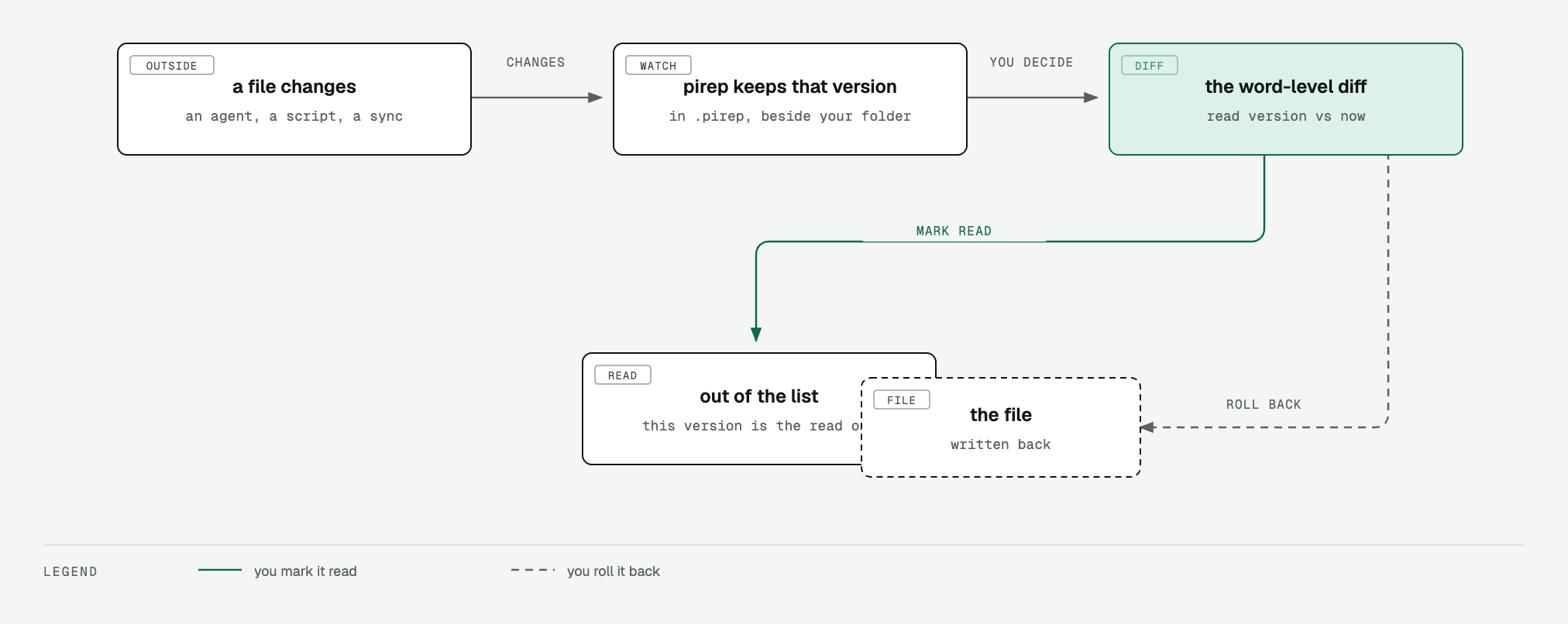
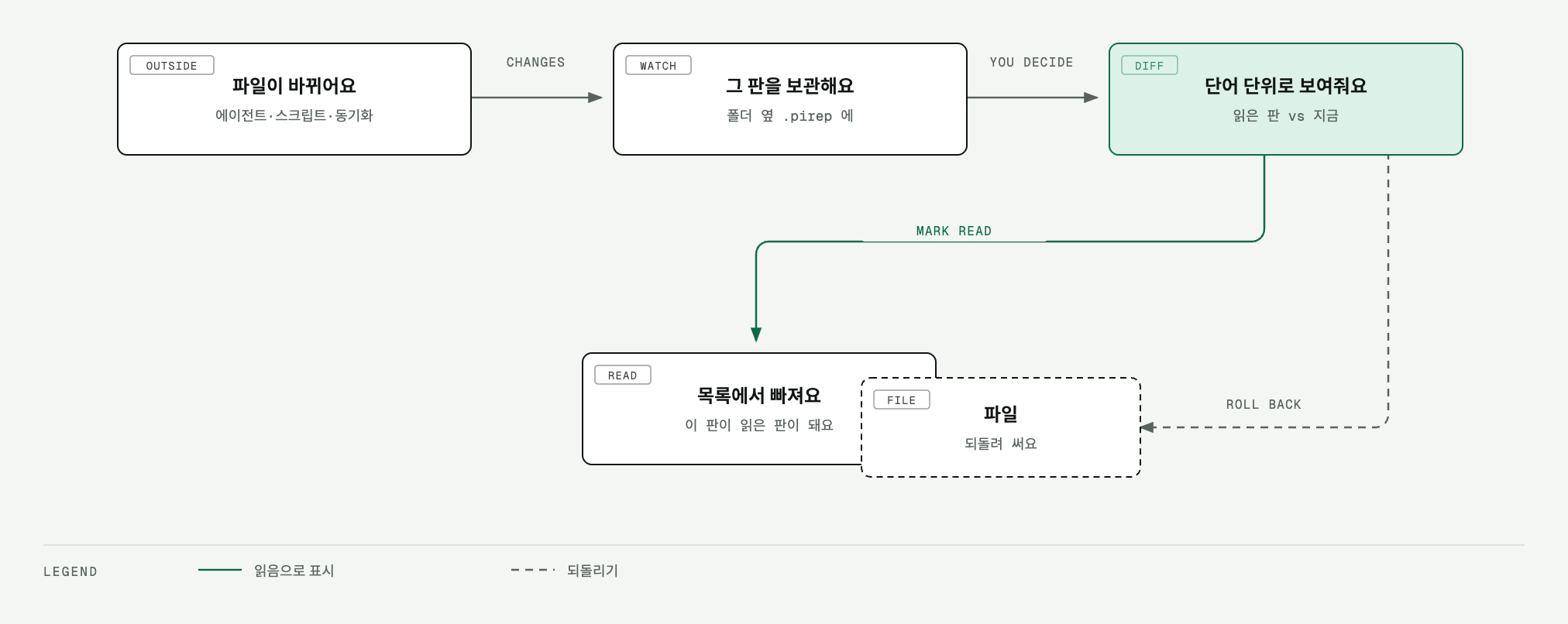
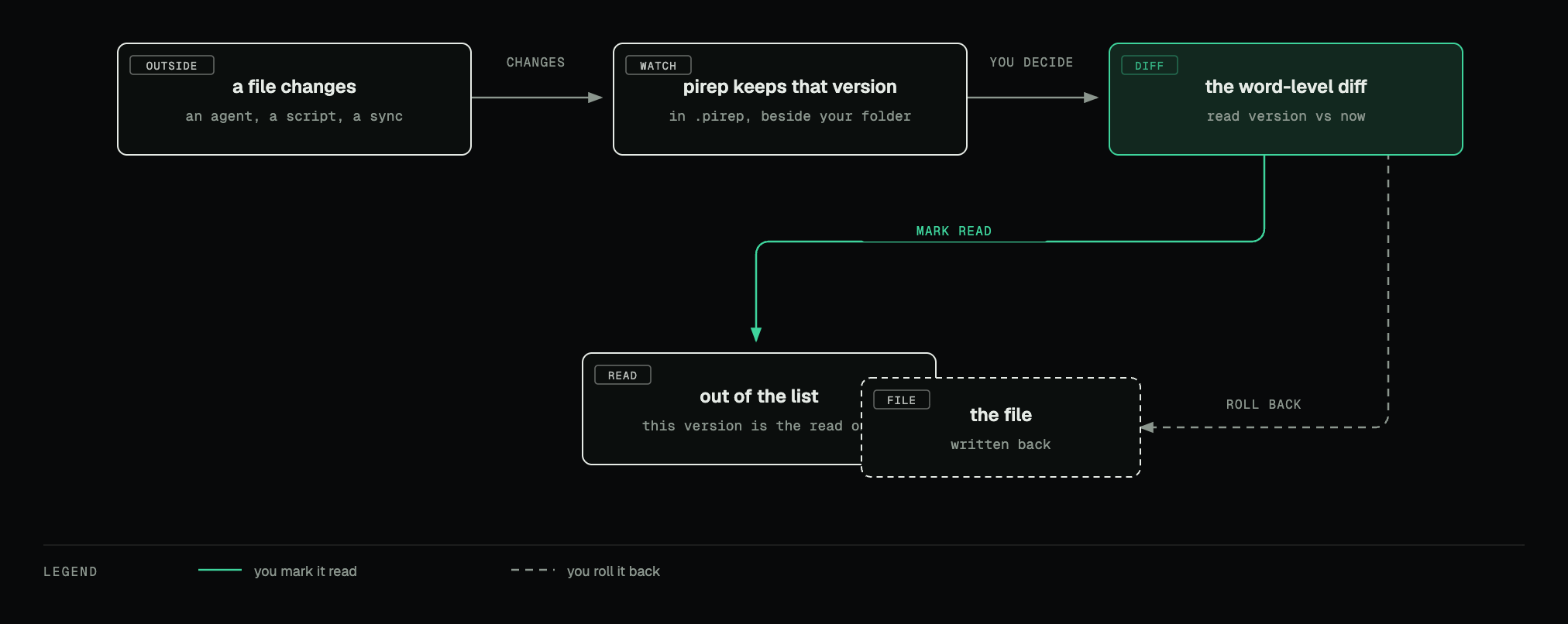
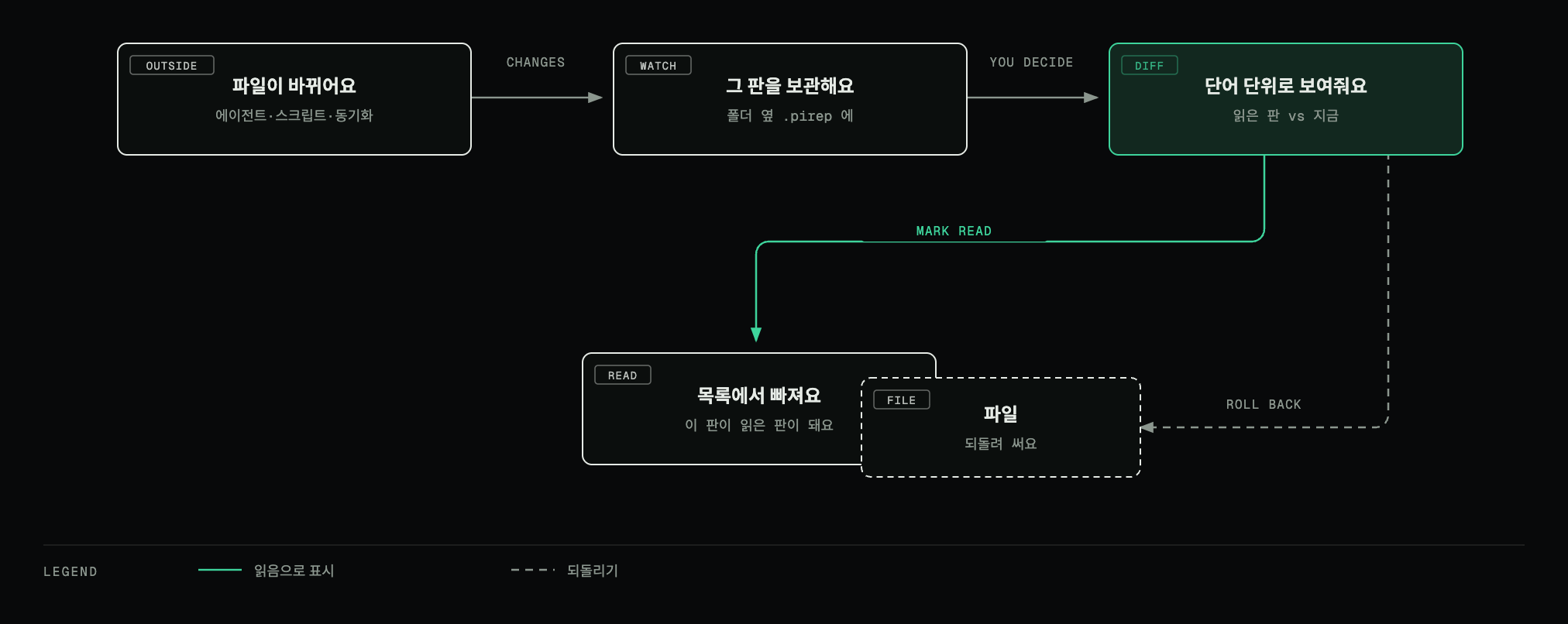
you decide what happens next — nothing is written back without you다음에 뭘 할지는 내가 정해요. 내가 시키지 않으면 파일에 되쓰지 않아요
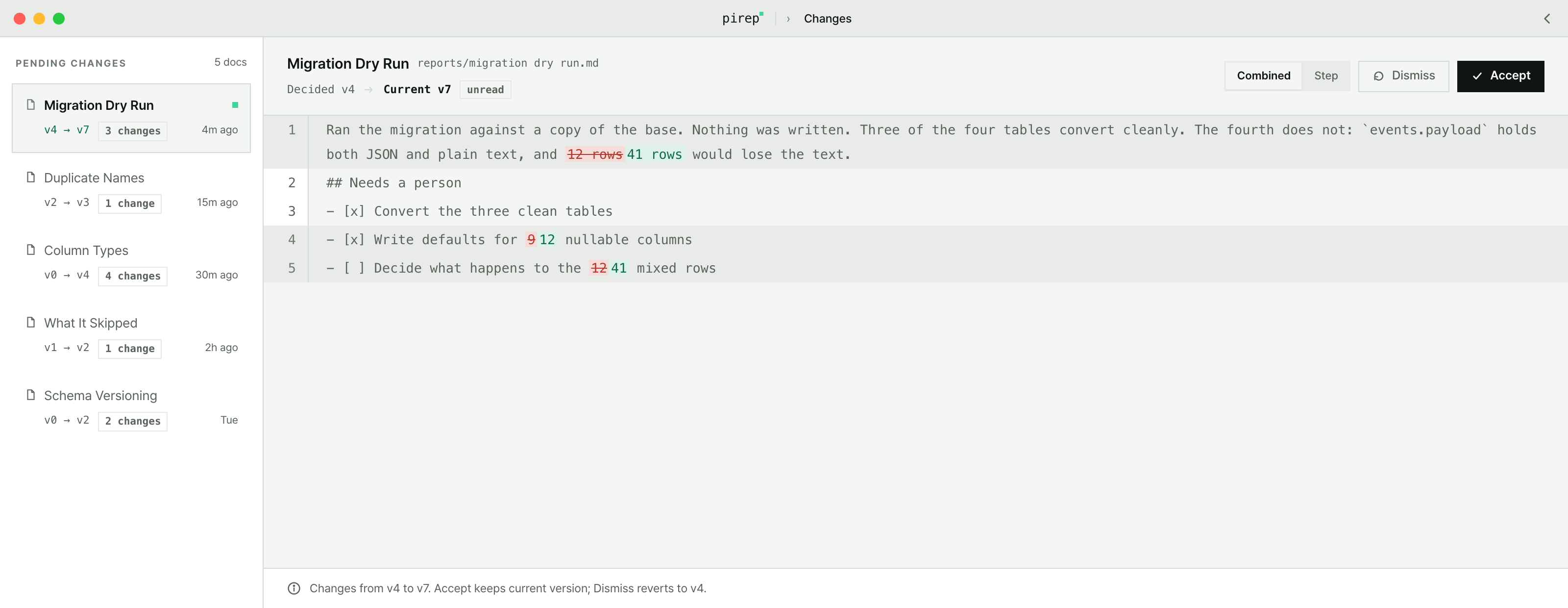
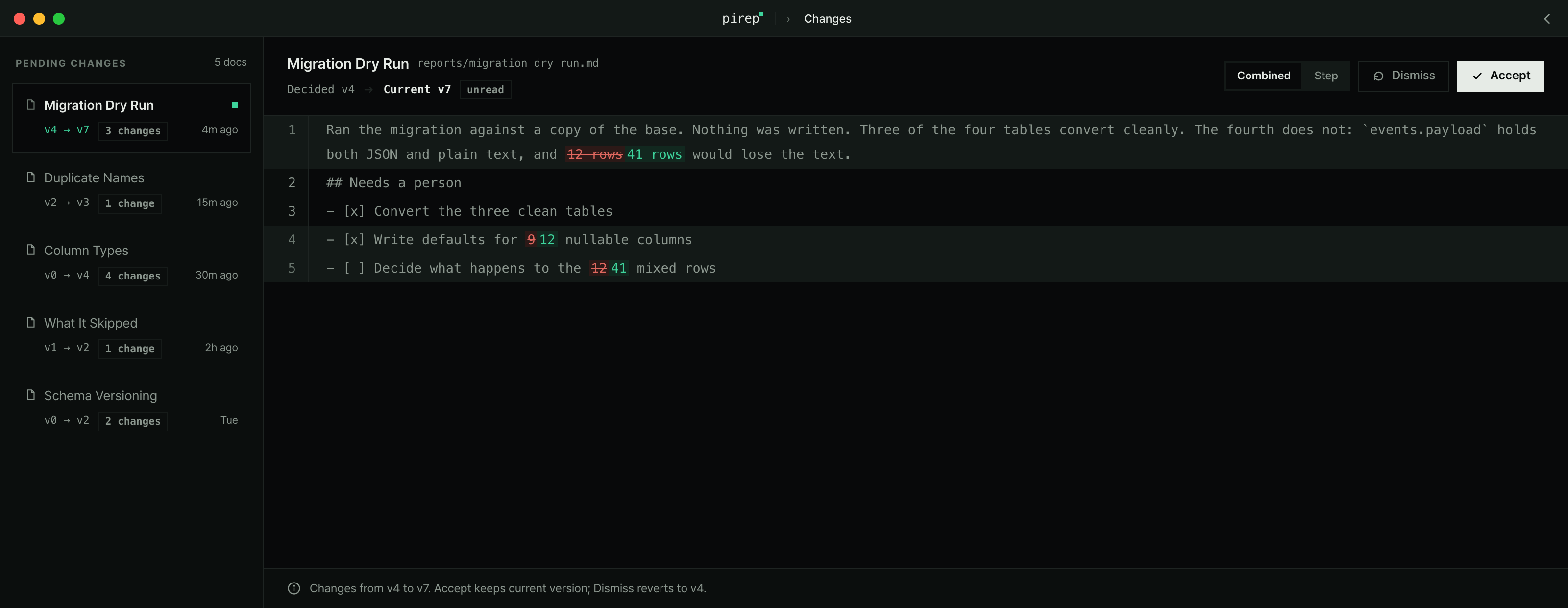
Review changes is ⌘U. Mark as read is ⇧⌘R. Settings has a switch that marks a document read when you close it.바뀐 내용으로 가기는 ⌘U, 읽음 표시는 ⇧⌘R이에요. 문서를 닫을 때 읽음으로 표시하는 설정도 있어요.
Where the versions are kept버전이 쌓이는 곳
Inside your Base there is a .pirep folder: one copy per version, plus the change log. That folder is the only thing pirep adds to your Base. Delete it and the history goes with it — your documents are untouched.Base 안에 .pirep 폴더가 생겨요. 판마다 사본 하나씩과 변경 기록이 들어가요. pirep이 Base에 더하는 건 그 폴더 하나뿐이에요. 지우면 기록도 같이 사라지고, 문서는 그대로예요.
Editing편집
⌘E opens the source of the document you are reading. It saves itself 1.2 seconds after you stop typing — there is no save button and no save shortcut to remember.⌘E를 누르면 읽고 있던 문서의 원문이 열려요. 타이핑을 멈추고 1.2초 뒤에 알아서 저장돼요. 저장 버튼도, 외울 저장 단축키도 없어요.
Editing a file is a change like any other, so pirep does not add your own edit to the Changes list — that list is for what happened outside the app.내가 고친 것도 변경이지만, Changes 목록은 앱 밖에서 일어난 일을 위한 자리예요. 그래서 내 편집은 거기 올라오지 않아요.
Files that are not markdown마크다운이 아닌 파일
A notes folder is never only markdown, so pirep opens what it finds next to it rather than sending you to another app.노트 폴더에 마크다운만 있는 경우는 없어요. 그래서 옆에 있는 파일도 다른 앱으로 보내지 않고 그 자리에서 열어요.
HTML slides and PDFs go full screen for presenting.HTML 슬라이드와 PDF는 전체 화면으로 띄워 발표할 수 있어요.
Finding things찾기
⌘K opens the command palette — Search notes or type a command. It searches documents and runs commands from the same box.⌘K를 누르면 명령 팔레트가 열려요 — Search notes or type a command. 문서 검색과 명령 실행이 같은 칸에서 돼요.
Inside an open document, the find bar (Find in page…) searches that document. Related Topics suggests other documents in the Base; ⌘O opens one of them.문서를 열어 둔 상태에서는 찾기 막대(Find in page…)가 그 문서 안을 찾아요. 관련 주제는 Base 안의 다른 문서를 권해 주고, ⌘O로 그중 하나를 열어요.
Shortcuts단축키
These are the defaults. Every one of them can be re-bound in Settings → Shortcuts.아래는 기본값이에요. 전부 설정 → Shortcuts 에서 다시 지정할 수 있어요.
Settings설정
Settings opens from the icon in the title bar and takes the whole window. Eight sections:설정은 창 위쪽 아이콘에서 열리고 창 전체를 써요. 여덟 개 절이에요.
Where your files and data live파일과 데이터가 있는 곳
Everything is on your machine, and most of it is in the folder you chose.전부 내 컴퓨터에 있고, 대부분은 내가 고른 폴더 안에 있어요.
No document content leaves your machine, ever. The app has no telemetry and no sync. The only outbound request it can make is looking up the latest GitHub release, and only if you press Check for updates in Settings — that check is not finished yet and currently fails.문서 내용은 어디로도 나가지 않아요. 원격 수집도 동기화도 없어요. 밖으로 나가는 요청은 설정에서 Check for updates를 눌렀을 때 GitHub 최신 릴리스를 확인하는 것 하나뿐인데, 그 확인은 아직 완성되지 않아서 지금은 실패해요.
The website makes no third-party requests. The one exception is Cloudflare Web Analytics, run by the host itself: no cookies, and Cloudflare already sees the IP.웹사이트는 제3자에게 요청을 보내지 않아요. 예외는 호스트가 운영하는 Cloudflare Web Analytics예요. 이 분석은 쿠키를 사용하지 않지만, Cloudflare는 이미 IP 주소를 볼 수 있어요.
Removing it지우기
Drag pirep out of /Applications. Your documents are untouched — they were never anywhere else./Applications 에서 pirep을 빼면 돼요. 문서는 건드려지지 않아요. 애초에 다른 데 있던 적이 없어요.
The version history stays in .pirep inside your Base until you delete that folder yourself.버전 기록은 Base 안 .pirep 에 남아 있어요. 직접 지우기 전까지는 그대로예요.